

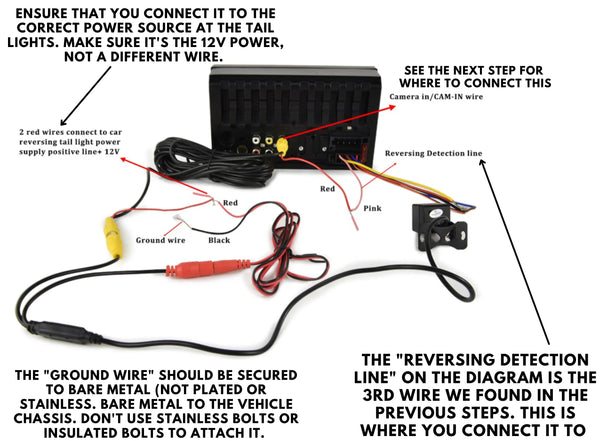
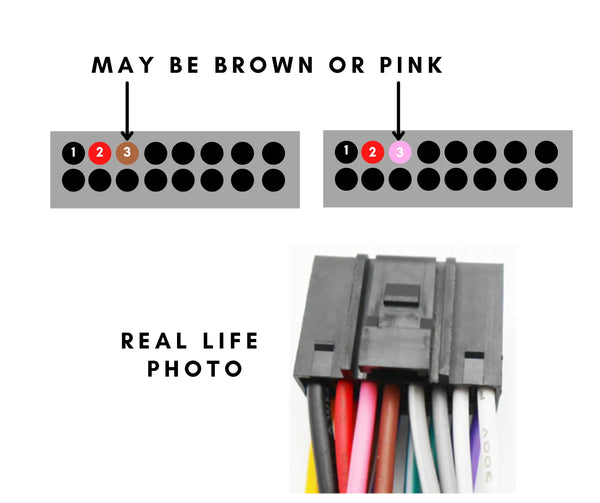
FINDING THE REVERSE DETECTION LINE
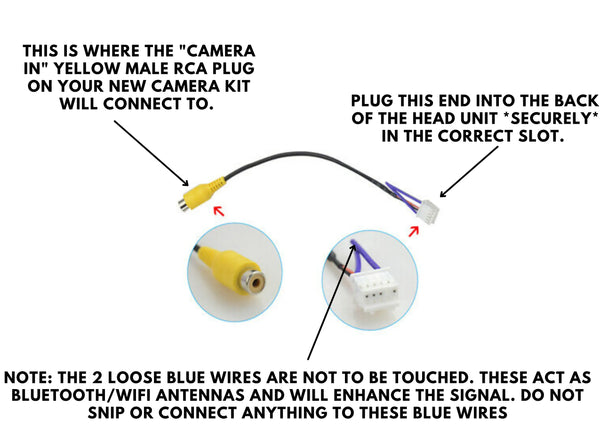
Where to connect the yellow RCA plug:
HOW TO FIX NO SIGNAL or BLANK SCREEN WHEN IN REVERSE:
1. When you go into reverse, and the NO SIGNAL screen (or Blank Screen) appears, press on the screen and release. An options box will appear.
2. Click the little car icon button in the bottom left corner to open the next window.
3. Now, you will have 1 of 2 things appear. First one, will be a slider option box at the top of the new window. Change the option to 720p 25hz, then click OK. If a list of 4 options appears instead, click the second last option (the camera with the "R" icon next to it) - and a list of options will appear. Change this option to 720p 25hz, and click ok.
4. If no image still appears, contact us for troubleshooting.